visvoai-cli · open source · MIT licensed
A terminal coding agent that takes permissions seriously
Most coding agents hold real power over your machine, gated by nothing stronger than a system prompt. This one is different: the operating system enforces the rules, not the prompt — every shell command is classified read or write, and on macOS and Linux reads run inside a kernel-level no-write sandbox, whether the model gets the classification right or not.
pip install visvoai-cli
The kernel is the backstop, not the prompt
Ask an agent nicely not to write files during a "read-only" command and you're trusting a classifier. visvoai-cli trusts one too — classify_command() sorts every shell command as read or writefrom its verbs and flags — but it doesn't stop there. Every command classified read actually runs inside an OS sandbox that denies file writes at the kernel level: sandbox-exec on macOS, bwrap on Linux. Where neither is available the sandbox can't apply, and the classifier stands alone — so on Linux, install bubblewrapif it isn't already there.
READ_VERBS = frozenset({
    "ls", "cat", "head", "tail", "grep", "rg",
    "find", "pwd", "git" /* status, log, diff… */,
    "jq", "awk", "sed", ...
})

def classify_command(command: str) -> str:
    """Return 'read' or 'write'.
    Conservative: anything unrecognized is 'write'."""
# macOS seatbelt profile — deny all file writes,
# keep stdout/stderr/tty/null writable for plumbing.
_SEATBELT_PROFILE = (
"(version 1)(allow default)"
"(deny file-write*)"
'(allow file-write-data (literal "/dev/null") '
'(literal "/dev/stdout") (literal "/dev/stderr"))'
)
if system == "Darwin":
return ["sandbox-exec", "-p", _SEATBELT_PROFILE,
"/bin/sh", "-c", command]
if system == "Linux":
return ["bwrap", "--ro-bind", "/", "/", ...]The failure geometry only ever bends one way: misclassify a write as a read and the sandbox turns it into a loud EPERM, never a silent mutation. Misclassify a read as a write and you get one extra approval prompt. There is no path where the model's mistake becomes your data loss.
Three approval modes, one keystroke
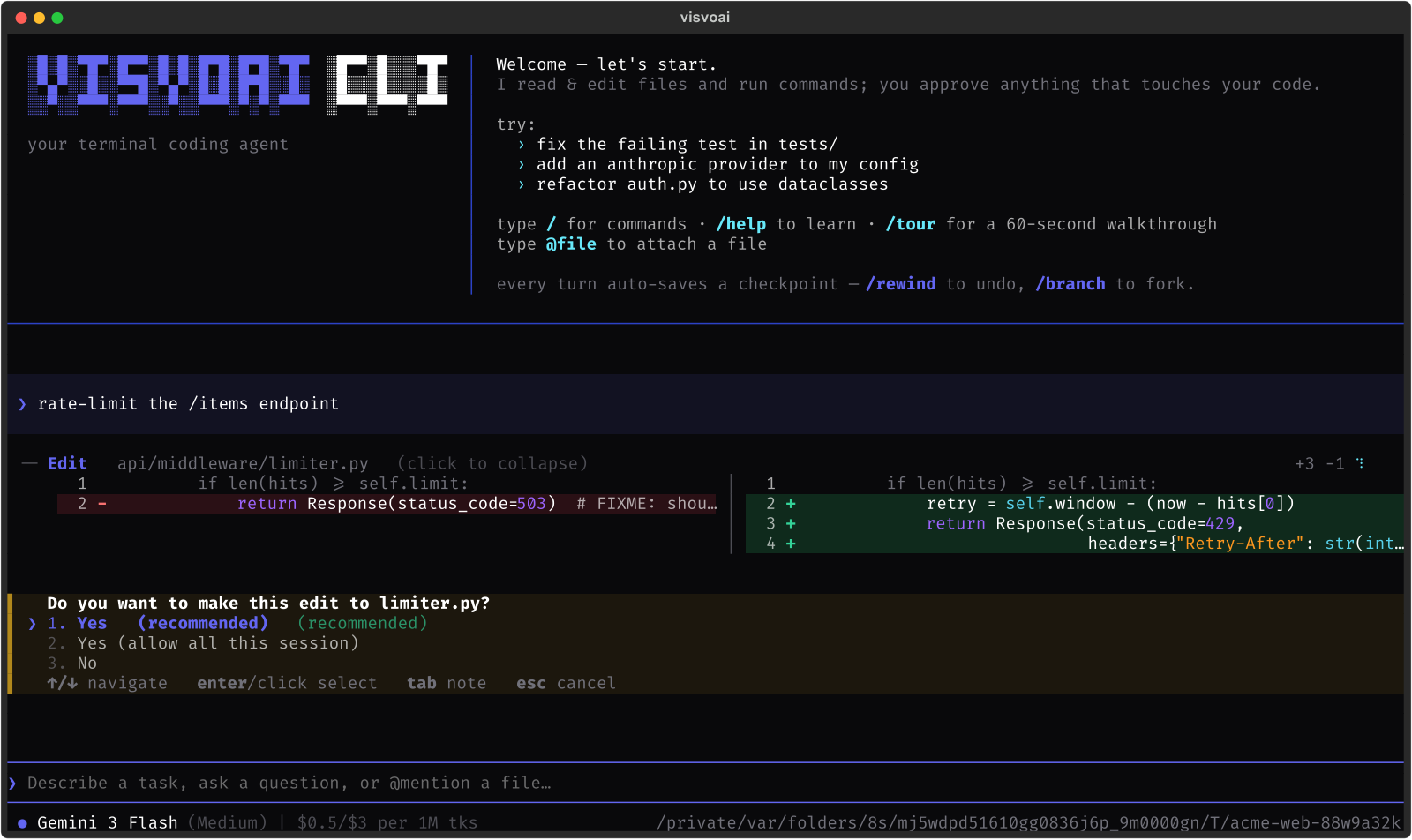
Shift+Tab cycles normal (ask before every edit and shell command), auto-edit (file edits run unattended, shell still asks), and accept-all. Modes are session-only — every launch starts back at normal — and they relax approval only.
Path confinement lives underneath the mode, not inside it: writes resolve through a confine() check that follows symlinks and .. before deciding, and rejects anything outside your project root (plus any roots you opt into) — and anything inside .git. Even accept-allcan't write there. A mode changes when you're asked, never what's allowed to be touched.
Nothing from a cloned repo turns itself on
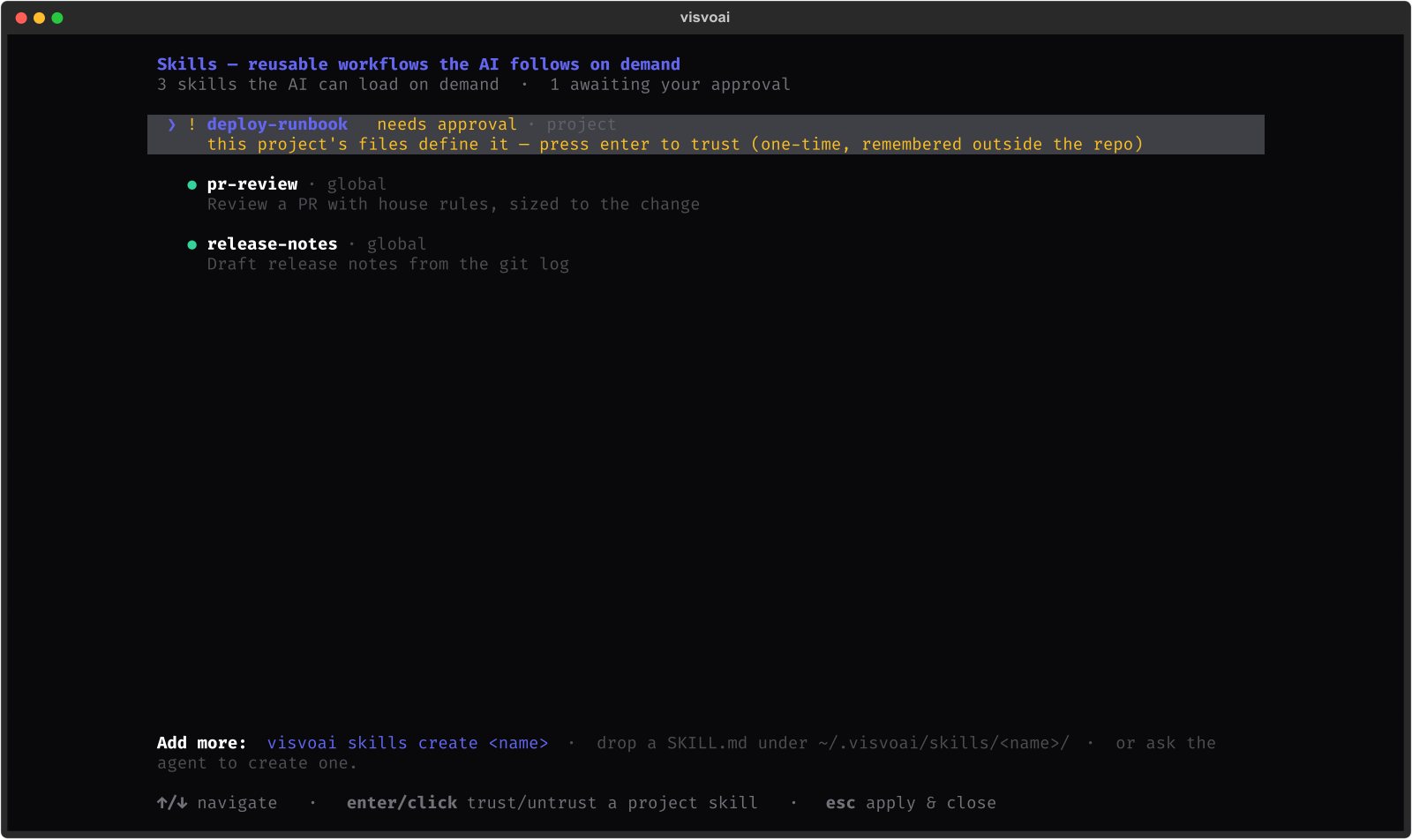
A repo can ship its own agents (.visvoai/agents/*.md), skills, and MCP servers — each one is a prompt or a subprocess spec that steers what happens on your machine. The CLI treats that like any other untrusted input: you approve it once, the approval is a SHA-256 hash of the definition recorded outside the repo, and any edit to the file re-prompts you.
Anything you define yourself in ~/.visvoai/is implicitly trusted — it's yours. Cloning someone else's project can never silently hand it capability.
Everything a real coding session needs
Agents & subagents
Delegate self-contained work to a fresh, isolated conversation — its own system prompt, its own tool set, empty history — and only its final answer returns to the caller. Multiple dispatches in one turn run concurrently, so fan-out search and parallel review are natural. Two built-ins ship ready: explore (read-only, zero approval prompts, safe to parallelize hard) and general (the full toolset — its mutations still ask you). A side panel streams every running agent's tool steps live; /runs gives full logs with per-run stop; every dispatch persists a JSONL trace with tokens, cost, and duration.
---
description: Reviews a diff for bugs and risky changes
tools: read-only
---
You are a meticulous code reviewer. Examine the diff, read
surrounding context, and report concrete findings with
file:line references.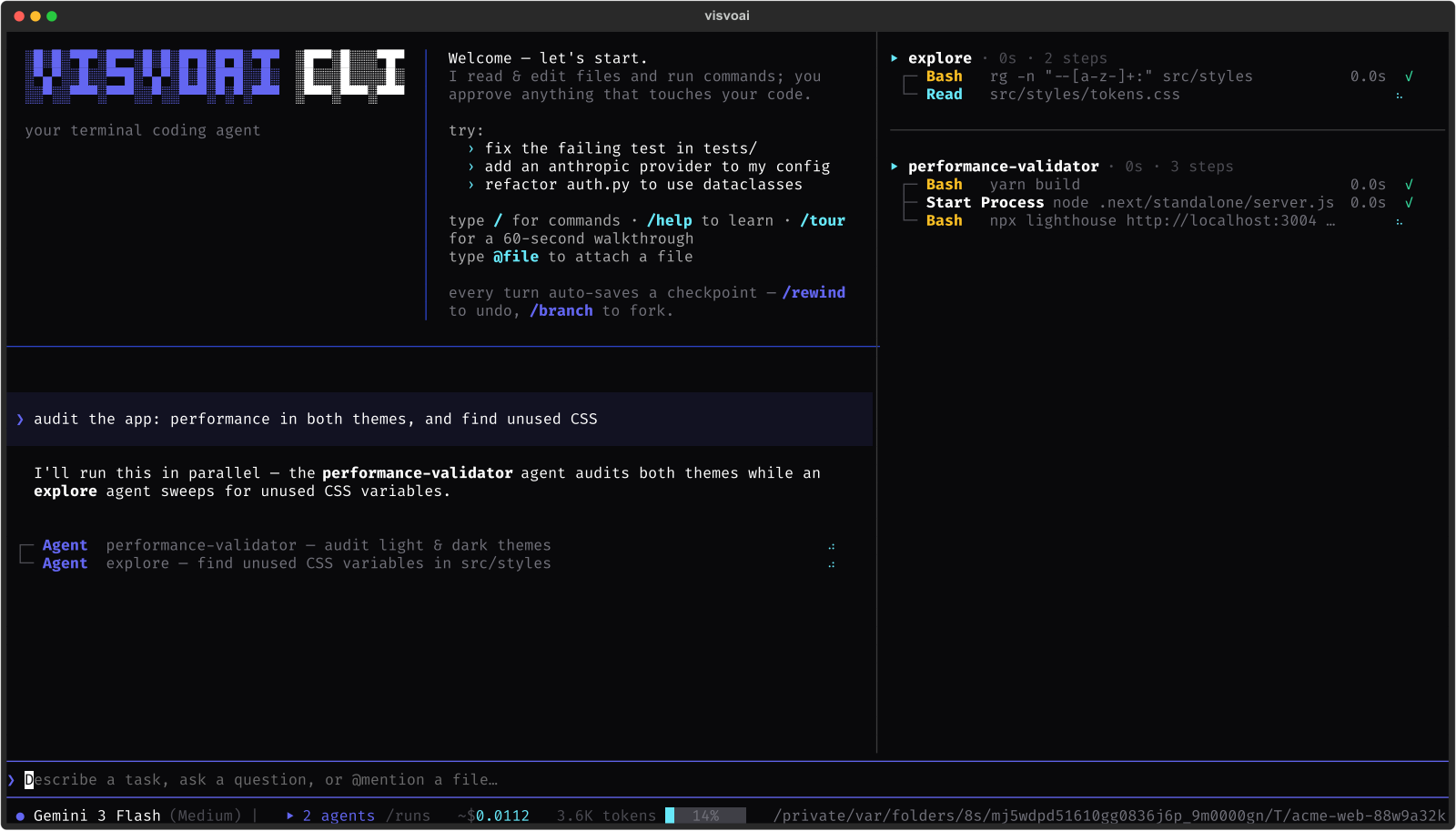
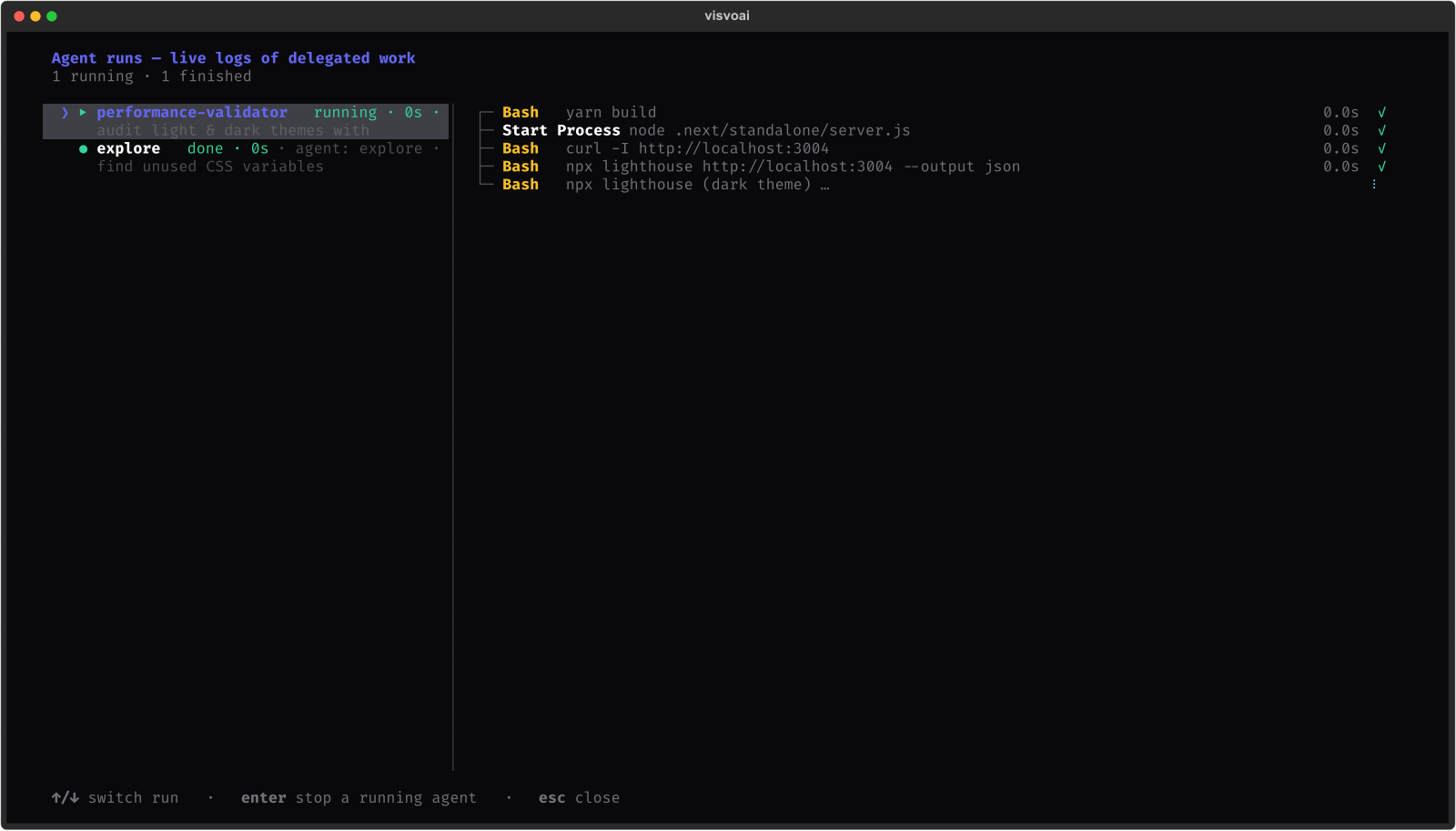
/runs — every dispatch, live, independently stoppable
Skills
Teach a workflow once as a SKILL.md — description up front (what the agent sees in its tool index), instructions in the body, supporting files loaded lazily only when a step actually references them. A skill grants knowledge, never capability: the agent still executes with its own gated tools, so a skill can't quietly unlock anything the permission model wouldn't otherwise allow. Point extra_dirs at a skill library you already have (Claude Code's, a team's shared repo) and it loads as your own trusted skills.
---
description: Draft release notes from the git log
args:
  version: The version being released
---
1. Run `git log $version..HEAD --oneline`.
2. Group changes by type; see checklist.md for the
   house format.
MCP servers
Connect any Model Context Protocol server — stdio subprocess or remote streamable HTTP — with one command. Sessions persist for the life of the CLI process, so a stateful server (a live browser, a DB connection) keeps its state across calls instead of reconnecting cold every time. Secrets are never pasted into config: ${VAR} references expand from your environment at connect time, and a project-defined server needs the same one-time, hash-pinned approval as a project agent.
visvoai mcp add chrome -- npx -y chrome-devtools-mcp@latest

visvoai mcp add linear --url https://mcp.linear.app/mcp \
    --header 'Authorization=Bearer ${LINEAR_API_KEY}'
Time-travel: rewind, branch, fork
Every tool batch checkpoints your working tree right before it runs — a shadow git commit mapped to a message index — so code and conversation always rewind together. /rewind (Ctrl+B) restores files and chat to any earlier point in one action. /branch switches between saved timelines of the same conversation. /fork opens a past checkpoint in a brand-new folder so you can explore two directions in parallel without losing either. /log lists the full checkpoint chain; /export saves a shareable transcript or bundle.
/rewind      # restore files + chat to an earlier point
/branch      # switch timelines of this conversation
/fork        # open a checkpoint in a new folder
/log         # list this timeline's checkpoints
Plugin tools
Drop a Python file in ~/.visvoai/tools/ with a module-level TOOLS list and restart — that's the whole integration surface. make_cli_tool reads your function's type hints for the schema and its docstring for the model-facing description, caps output so one call can't flood context, and turns exceptions into 'ERROR: …' text instead of crashing the turn. Gating is a one-word declaration per tool: None for pure reads that run silently, 'approve' to route through the same user gate as every built-in mutation, 'self' when the function handles its own confirmation. Deliberately global-only — a cloned repo can never inject Python into your session.
def tag_release(version: str, message: str = "") -> str:
    """Create an annotated git tag for a release (asks you first)."""
    out = subprocess.run(["git", "tag", "-a", version,
                           "-m", message or version],
                          capture_output=True, text=True, timeout=10)
    return out.stderr or f"tagged {version}"

TOOLS = [
    make_cli_tool(git_authors, gate=None),       # read → runs silently
    make_cli_tool(tag_release, gate="approve"),  # mutates → you confirm
]
One key. One install. Start now.
Every provider ships in the box — Gemini, Claude, GPT, Together, Groq, OpenRouter, and more show up live in the model picker. You only need a key for the one you use.
pip install visvoai-cli
export GEMINI_API_KEY=...   # or ANTHROPIC_API_KEY / OPENAI_API_KEY / any compatible
visvoai Built on the published visvoai-core loop and visvoai-ai model layer, unmodified — see the whole toolkit